How freelancers can track time per client without timers
By Aditya Trivedi ·
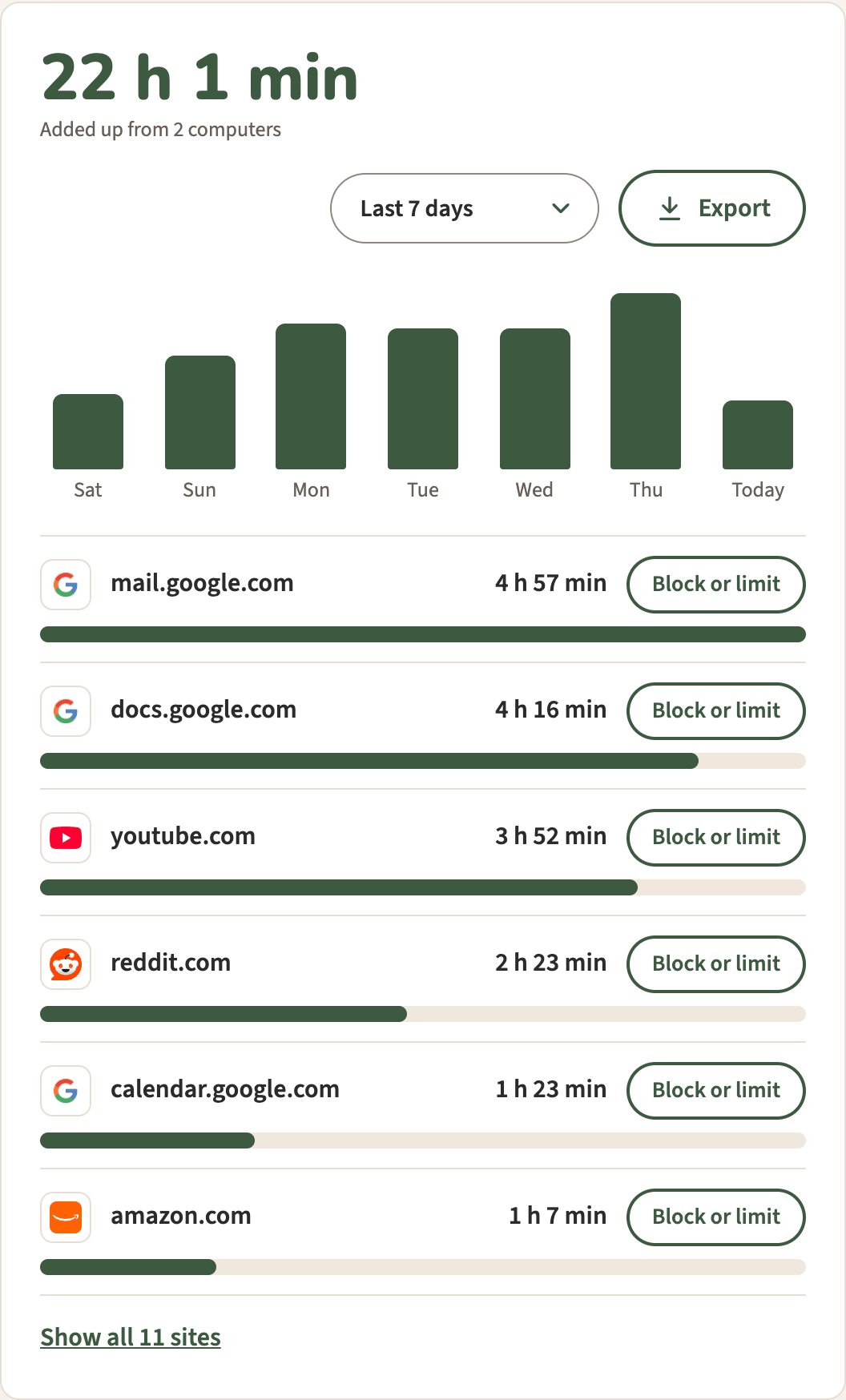
Without timers, the closest you can get is automatic tracking, which counts time by website, not by client. That helps when your clients use different sites or tools, and Export lets you tag the rest in a spreadsheet. When two clients share a site, like docs.google.com, the count can’t tell them apart, and a short note each day fills that gap.
We make Pawsome Family, a Chrome and Edge extension whose Screen time counts how long each website is on your screen. This post is about what that can and can’t do for client work. Nothing here is tax or accounting advice.
What counting by site can tell you
Screen time keeps each site’s name and its minutes for each day. A site is its address without www., and each subdomain is its own site, so mail.google.com and docs.google.com are counted apart. Whether that splits your clients depends on where you do their work.
| How you work for clients | Does it split by client? |
|---|---|
| Each client has their own web app or site you work in | Yes, each is its own site |
| Each client uses a different tool, on a different site | Yes |
| Two clients’ files on docs.google.com | No, it’s one site |
| A folder for each client in the same online drive | No, it’s one site |
| One inbox for all clients | No, it’s all mail.google.com |
| Calls, phone work, or apps outside the browser | Not counted at all |
For some freelancers, the site list is most of the answer. For others, most of the day sits in two or three shared sites, and the list alone won’t say which client the time was for.
Two more things to know before you bill from it:
- It counts on-screen time only. A site counts while its tab is on screen and in use, or while a video plays in it. Counting stops after 2 minutes without the mouse or keyboard, so long reading or thinking time can go uncounted. Treat the number as a floor, not the whole job.
- Private windows are never counted. Work done in an incognito window won’t show.
Why a log beats memory
Filling in hours from memory at the end of the week is guesswork. A 2021 review of studies that compared people’s estimates of their own screen use with logged use found the two rarely matched. In only 3 of 49 comparisons was the average guess within 5%, and people missed in both directions. A count by site gives you something firmer to check your notes against.
A routine: export, then tag
Export comes with the free trial or the plan: $3.33 a month, billed yearly at $40, or $5 billed monthly.
- Let it count. Screen time counts on its own while you work. There are no timers to start or forget.
- Export. On the Screen time page, select Export. A file called screen-time.csv downloads.
- Open it. In Google Sheets, choose File, then Import, and pick the file (Google’s steps). In Excel, use File, then Open, or Data, then From Text/CSV (Microsoft’s steps).
- Add a Client column. Tag each row whose site belongs to one client. For shared sites, use your notes for that day, or split the minutes.
- Add it up. Sum the minutes by client and month, for example with a pivot table, and divide by 60 for hours.
The file has three columns, Date, Site and Minutes, with one row per day and site, longest first within each day. Here’s what one tagged day might look like. The rows are an example, and projects.example.com stands in for a client’s own web app:
| Date | Site | Minutes | Client |
|---|---|---|---|
| 2026-11-12 | mail.google.com | 71 | Split by notes |
| 2026-11-12 | docs.google.com | 63 | Client A |
| 2026-11-12 | projects.example.com | 45 | Client B |
| 2026-11-12 | youtube.com | 28 | None |
A few details about the file:
- It goes back to the start. It has every day counted since Screen time was switched on, not just the last 30 days.
- Minutes are rounded to the nearest minute, and a site with under half a minute in a day is left out.
- Each day is added up across all the computers on your account.
More on the file in how to export your browsing time to a spreadsheet.
What about Chrome profiles?
Chrome profiles keep each client’s sign-ins, bookmarks and extensions in separate windows, which helps keep the work tidy. They don’t split Screen time, though. Screen time adds up everything counted on one account, from all its computers, into one total, and has no split by profile. The split by client still comes from the site names and your tags.
Which records to keep
In the US, the IRS says a business can use any recordkeeping system that clearly shows its income and expenses, and lists invoices among the documents that support what you earned. That page doesn’t mention timesheets. A time log is useful because it backs up what you bill. The IRS’s general rule is to keep records for 3 years, and longer in some cases. Rules differ in other countries.
A simple habit: export at the end of each month, tag it, and keep the file with that month’s invoices. If the trial ends without a plan, counting carries on and nothing is deleted, so the older days are there when you get it.
Screen time for client work
Pawsome Family’s Screen time counts the minutes each website is on your screen in Chrome and Edge, with no timers to start, and Export turns them into a spreadsheet you can tag. The help page covers every setting.
Free for 30 days, with no card needed.