Webtime Tracker alternatives
By Aditya Trivedi ·
The closest Webtime Tracker alternative is Time Tracker - Web Habit Builder. It’s free and open source, keeps your history on your computer, and can import your Webtime Tracker data in one click. Web Activity Time Tracker and TimeSpy are other free options that keep data in the browser. If you want your time added up across computers, with a weekly email and a blocker built in, Pawsome Family’s Screen time does that in Chrome and Edge, free for 30 days and then partly free.
We make Pawsome Family, a Chrome and Edge extension whose Screen time counts how long each website is on your screen, so it’s one of the options here. We haven’t tested the others. What we say about each one comes from its own website, privacy policy or store listing, checked on November 13, 2026.
What Webtime Tracker does
Webtime Tracker is a free Chrome extension made by one developer. It counts “Time spent on individual websites, detailed domain stats, and total browsing time”, only while the Chrome window is active. It has charts, a Today overview, daily averages, all-time stats, backup and restore, and CSV export. You can set its idle time, and choose to keep counting while media is playing.
It’s “Completely free and with no ads”. Its privacy policy says “All data are stored offline in your browser” and “No data are transmitted to anywhere, ever.” It has about 100,000 users on Chrome and a 4.7-star rating. A Firefox version also exists, last updated on April 9, 2023.
Why people look for an alternative
- Updates. Its Chrome listing was last updated on March 31, 2025. We found no notice that it has stopped.
- More than one computer. Its data stays in each browser, so a work and a home computer each keep their own numbers.
- Limits. It counts time, but doesn’t block or limit sites.
- A weekly look back. With no account, there’s no email.
The alternatives at a glance
| Tracker | Works on | Data kept | Limits or blocking | Price |
|---|---|---|---|---|
| Time Tracker - Web Habit Builder | Chrome, Edge, Firefox | On your computer, with optional sync you set up | Yes, with time limits | Free |
| Web Activity Time Tracker | Chrome, Edge | On your computer | Yes, daily limits | Free, with optional sponsored content |
| TimeSpy | Chrome | On your computer | “Block Websites” is in its name | Free, no ads |
| Pawsome Family Screen time | Chrome and Edge on computers | Site names and minutes, on your account | Block or limit, through our website blocker | Free for 30 days, then $3.33 a month, billed yearly |
Prices and features checked on their own sites and store pages in November 2026.
Free, and kept on your computer
Time Tracker - Web Habit Builder
Free and open source, for Chrome, Edge and Firefox, with “no subscriptions”. It “automatically logs screen time” by site, category or tab group, and says “100% of your history stays on your machine”, with no account required. It has a website blocker with “flexible time limits and rules”, exports to CSV or JSON, and can sync through a storage service you choose. It imports from Webtime Tracker and Web Activity Time Tracker in one click. On Chrome it has about 10,000 users and was updated on November 12, 2026.
Web Activity Time Tracker
It counts time on each site on its own, with daily limits that block a site once reached, a Pomodoro mode and CSV export. Its listing says core tracking “runs locally in your browser”. It’s on Chrome and Edge, with about 30,000 users on Chrome.
Two things to know. Its original author’s page says “The Chrome extension has been sold”, and the listing is now run by a company called Media IntelliView. The new owner’s privacy policy describes an opt-in feature that is “off by default”. If you turn it on, “a signed, clearly labeled sponsored overlay may be placed on the websites you visit”, and the name of the site you’re on is sent to the company’s server. A sponsored banner may also appear on the extension’s own pages, and it can be turned off in Settings.
TimeSpy
The original author of Web Activity Time Tracker now publishes TimeSpy, a new listing of their own. Its full name is “TimeSpy - Block Websites, Pomodoro & Web Analytics”. It says “TimeSpy is ad-free and free extension” and keeps its data in Chrome’s local storage. It’s new, with about 100 users so far.
Added up across computers
Pawsome Family Screen time
Screen time is part of the Pawsome Family extension for Chrome and Edge. Like Webtime Tracker, it counts each site on its own and stops when you step away: after 2 minutes without the mouse or keyboard, unless a video is playing in that tab. Private windows are never counted. Our post on why time trackers stop counting when you step away explains why that matters for your totals.
The difference is where the numbers go. Screen time keeps each site’s name and its minutes for each day on your account, so a work and a home computer add up into one total. Never page addresses, titles or anything on the page.
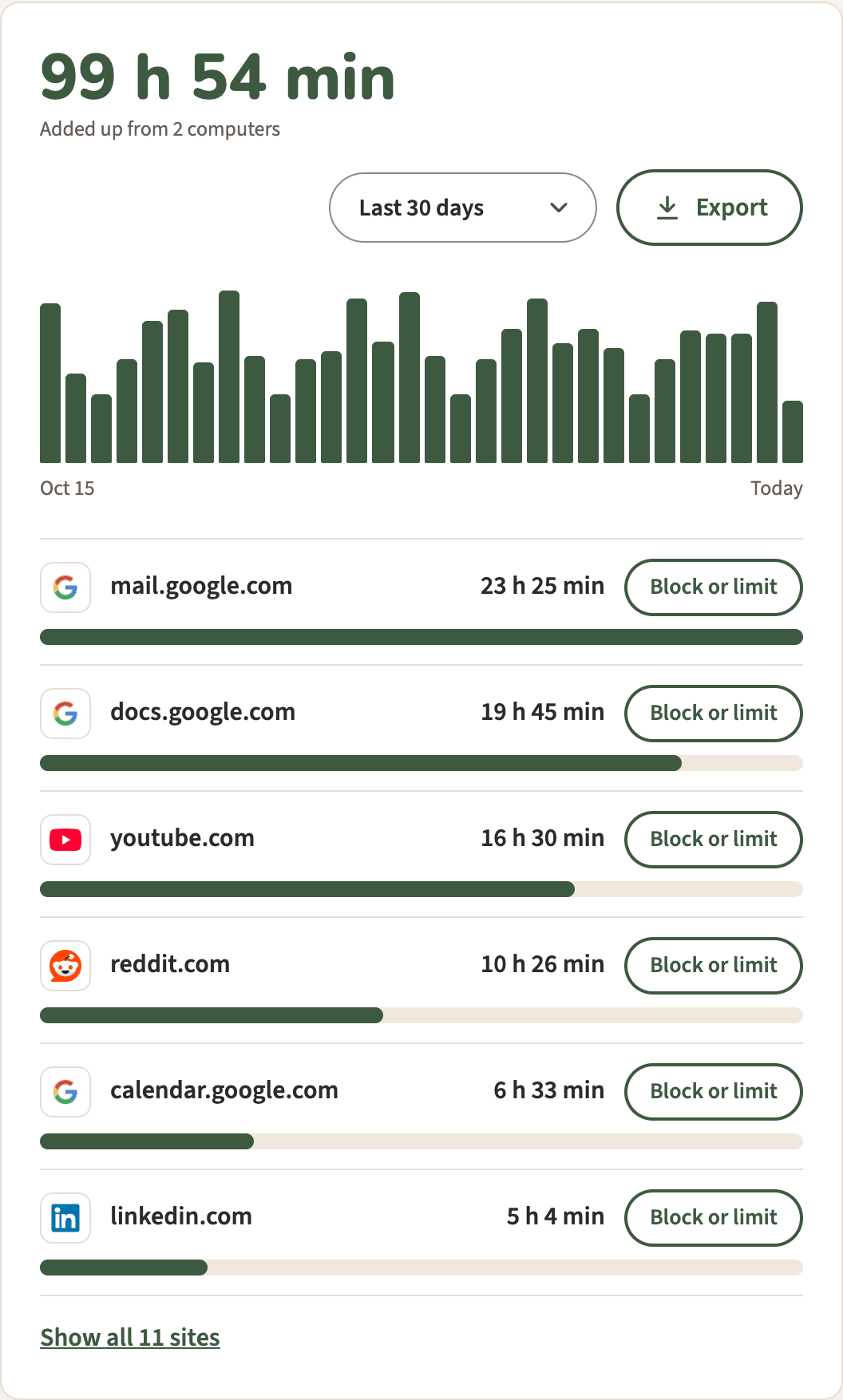
The page shows Today, Last 7 days or Last 30 days, with Export to a spreadsheet and Block or limit next to each site. A Monday email sums up the week before.
It isn’t free for good. After the 30-day trial, today, the last 7 days, your top sites and a basic Monday email stay free. The last 30 days, Export, Block or limit and the full email come with the plan, $3.33 a month, billed yearly at $40 (or $5 billed monthly). It doesn’t run in Firefox or Safari, or on phones.
How to choose
- Closest to Webtime Tracker, with recent updates: Time Tracker - Web Habit Builder.
- History kept on your computer, with no account: Time Tracker - Web Habit Builder or Web Activity Time Tracker.
- Two computers, one total, a Monday email: Pawsome Family.
If privacy is why you chose Webtime Tracker, our guide to whether a time-tracking extension is private explains what to check before you switch. For more options, see the best free time trackers for Chrome.
Screen time, in Chrome and Edge
Pawsome Family’s Screen time counts the minutes each site is on your screen, adds up your computers, and sends a short summary every Monday. It comes with Milo, a golden retriever who walks along the bottom of your tabs and can be hidden. Here’s how it works.
Free for 30 days, with no card needed.