StayFree alternatives for Chrome
By Aditya Trivedi ·
The best StayFree alternative depends on what you used it for. If you want usage stats with limits and blocking, Time Tracker - Web Habit Builder and Web Activity Time Tracker do both and keep their data on your computer. If you only want the stats, Webtime Tracker is free with no ads. And Pawsome Family’s Screen time counts each site in Chrome and Edge, then hands any site to its website blocker as a daily limit.
We make Pawsome Family, a Chrome and Edge extension whose Screen time counts how long each website is on your screen, so it’s one of the options here. We haven’t tested the others. What we say about each one comes from its own website, privacy policy or store listing, checked on November 13, 2026.
What StayFree does
StayFree’s Chrome extension shows “daily and historical web usage” in line and bar charts. It can “Block websites permanently, on a schedule, or after a daily time limit”, and adds category limits, a focus mode and PIN protection. It can share stats and limits with its Android app and desktop through a 6-digit pairing code. Its listing shows no paid tier.
It also lists a “Digital profile” feature, to help you “Understand the kind of ads you’re being shown and what websites are showing them.” It has about 200,000 users on Chrome and a 4.5-star rating. The listing says “StayFree is built by Sensor Tower,” a company in San Francisco.
What its privacy policy says
The privacy policy linked from StayFree’s listing belongs to Sensor Tower, Inc., and has been in effect since September 23, 2026. In its own words:
- It collects “stats on which websites you visit”, along with “ad interactions” and “website usage data”.
- This “Collected Data” is sent “to Sensor Tower’s servers”, with personal information “de-identified upon collection”.
- Sensor Tower may “generate, validate, and sell the Anonymized Information and insights about app ecosystems”.
- The app asks for your consent before it sends Collected Data.
On its Chrome listing, StayFree says it handles personally identifiable information, personal communications, location, web history, user activity and website content. Whether that matters is up to you. If it does, the options below keep less. Our guide to whether a time-tracking extension is private explains what to check before you install any tracker.
The alternatives at a glance
| Tracker | Time per site | Limits or blocking | Data kept | Price |
|---|---|---|---|---|
| Time Tracker - Web Habit Builder | Yes | Yes | On your computer | Free |
| Web Activity Time Tracker | Yes | Yes, daily limits | On your computer | Free, with optional sponsored content |
| Webtime Tracker | Yes | No | On your computer | Free, no ads |
| Pawsome Family Screen time | Yes | Through our website blocker | Site names and minutes, on your account | Free for 30 days, then $3.33 a month, billed yearly |
Prices and features checked on their own sites and store pages in November 2026.
With limits built in
Time Tracker - Web Habit Builder
Free and open source, for Chrome, Edge and Firefox. It logs time by site, category or tab group, and has a website blocker with “flexible time limits and rules”. It says “100% of your history stays on your machine”, needs no account, and its store listing says the developer “will not collect or use your data”. On Chrome it has about 10,000 users and a 4.9-star rating.
Web Activity Time Tracker
It counts time per site, with daily limits that block a site once reached, and a Pomodoro mode. Its core tracking “runs locally in your browser”. It was sold by its original author and is now run by a company called Media IntelliView. The new owner’s privacy policy describes a sponsored overlay on the websites you visit, “off by default”. If you turn it on, the name of the site you’re on is sent to the company’s server. Our Webtime Tracker alternatives covers it in more detail.
Stats only
Webtime Tracker
Free, “with no ads”, and its privacy policy says “No data are transmitted to anywhere, ever.” It counts time per site while the Chrome window is active, with charts and CSV export. It doesn’t limit or block anything. Its Chrome listing was last updated in March 2025.
A tracker that hands sites to a blocker
Pawsome Family Screen time
Screen time is part of the Pawsome Family extension for Chrome and Edge. It counts a site only while its tab is on your screen, stops after 2 minutes without the mouse or keyboard unless a video is playing, and never counts private windows. It keeps only site names and minutes per day, on your account, never page addresses or titles. Computers signed in to the same account add up into one total.
When one site takes too long, select Block or limit next to it. Choose Always, or a Daily limit of 15 min, 30 min or 1 hour, and it goes on your Website blocker list.
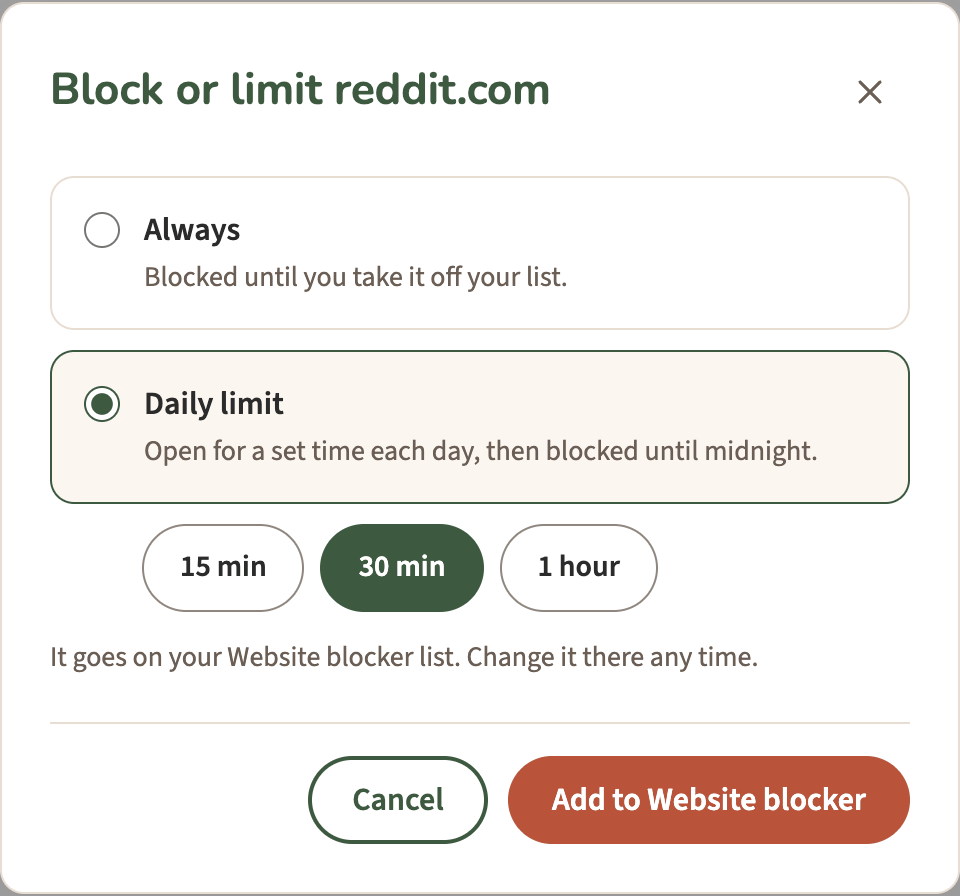
On the Website blocker page you can change it any time, or block a site on the days and times you pick. For how to choose a limit, see how to cut your social media time in half.
What it doesn’t do: run on phones or in Firefox and Safari, share limits with a phone app, or limit whole categories. Block or limit and Export come with the trial or the plan, not with the free part after it.
How to choose
- Stats and limits, with history kept on your computer: Time Tracker - Web Habit Builder.
- Stats only, free and simple: Webtime Tracker.
- Limits on your Android phone too: StayFree, which works with its Android app.
- Chrome and Edge on two computers, with a Monday email and a blocker built in: Pawsome Family.
Screen time, with a blocker built in
Pawsome Family’s Screen time counts the minutes each site is on your screen in Chrome and Edge, and Block or limit turns any site on your list into a daily limit. It comes with Milo, a golden retriever who walks along the bottom of your tabs and can be hidden. Here’s how it works.
Free for 30 days, with no card needed.