The best free time trackers for Chrome, compared
By Aditya Trivedi ·
The best free time trackers for Chrome that count each website on their own are Webtime Tracker and Time Tracker - Web Habit Builder. Both are free, need no account, and keep your data on your computer. If you need timers for projects and clients instead, Toggl Track and Clockify have free plans. “Free” means something different for each one, so the table below says what you get without paying.
We make a time tracker too, Pawsome Family’s Screen time, which is free for 30 days and then partly free. We haven’t tested the others. What we say about each one comes from its own website, help pages, privacy policy or store listing, checked on November 13, 2026.
Two kinds of time tracker
- Automatic: it notes which site is on your screen and for how long. There’s nothing to press.
- Timers: you start and stop a timer for each task, project or client. It suits billing, and it counts only while a timer runs.
At a glance
| Tracker | Kind | What’s free | Where data is kept |
|---|---|---|---|
| Webtime Tracker | Automatic, per site | Everything, with no ads | On your computer |
| Time Tracker - Web Habit Builder | Automatic, per site, with a blocker | Everything | On your computer |
| Web Activity Time Tracker | Automatic, per site, with daily limits | Everything; optional sponsored content | On your computer |
| ManicTime’s Browser Time Tracker | Automatic, with tags for clients | Everything | On your computer |
| StayFree | Automatic, per site, with limits | No paid tier on its listing | Website stats sent to Sensor Tower, with your consent |
| Toggl Track | Timers | A free plan | Toggl’s servers |
| Clockify | Timers | A free plan, with reports over 1 month | Clockify’s servers |
| Pawsome Family Screen time | Automatic, per site | 30 days; then today, the last 7 days and top sites | Site names and minutes, on your account |
Prices and features checked on their own sites and store pages in November 2026.
Free, and kept on your computer
Webtime Tracker
The most used of the four here, with about 100,000 users on Chrome and a 4.7-star rating. It counts time per site while the Chrome window is active, with charts, daily averages and CSV export. You can set the idle time, and keep counting while media is playing. It’s “Completely free and with no ads”, and “No data are transmitted to anywhere, ever.” Its Chrome listing was last updated on March 31, 2025. See Webtime Tracker alternatives.
Time Tracker - Web Habit Builder
Free and open source, for Chrome, Edge and Firefox, with “no subscriptions”. It logs time by site, category or tab group, has a website blocker with time limits, and exports to CSV or JSON. It says “100% of your history stays on your machine”, and no account is needed. It was updated on November 12, 2026, and has a 4.9-star rating from 154 ratings.
Web Activity Time Tracker
It counts time per site, with daily limits that block a site, a Pomodoro mode and CSV export. Tracking runs in your browser. Its original author sold it, and the new owner, Media IntelliView, offers optional sponsored content: a banner on the extension’s own pages, which you can turn off, and an overlay on the websites you visit, which is “off by default”. The original author’s new version, TimeSpy, says it is “ad-free and free”.
ManicTime’s Browser Time Tracker
ManicTime calls it “a free, separate, smaller product” from its paid desktop app. It counts browser time on its own, lets you tag it by “client, project, task”, and exports timesheets to CSV or Excel. Data stays in your browser, and there’s no account. It’s very new, at version 0.1.0 with 91 users, and its listing says it “may not record every focus change, idle transition, or short visit perfectly”.
Free, from Sensor Tower
StayFree
Free, with no paid tier on its listing. It counts time per site and can block sites always, on a schedule or after a daily limit. It’s built by Sensor Tower. Its privacy policy says it collects “stats on which websites you visit” and sends them to Sensor Tower’s servers, de-identified, after asking for your consent. Sensor Tower may sell “Anonymized Information and insights about app ecosystems”. More in StayFree alternatives.
Free plans of timer apps
Toggl Track
Its Free plan is “free forever”, with timers, focus mode, calendar integrations and personal reports. The Chrome extension puts a timer inside web tools like Trello and Asana. It doesn’t count every site on its own.
Clockify
Free for up to 5 users, with unlimited tracking, but reports cover 1 month and export is PDF only. Its extension is a timer too. The desktop app’s auto tracker records apps and sites on your computer, as a list you turn into entries yourself.
A free trial, then partly free
Pawsome Family Screen time
Screen time counts each site in Chrome and Edge while its tab is on screen. It stops after 2 minutes without the mouse or keyboard, unless a video is playing, and never counts private windows. It keeps only site names and minutes on your account, so two computers add up into one total, and it sends a short summary every Monday.
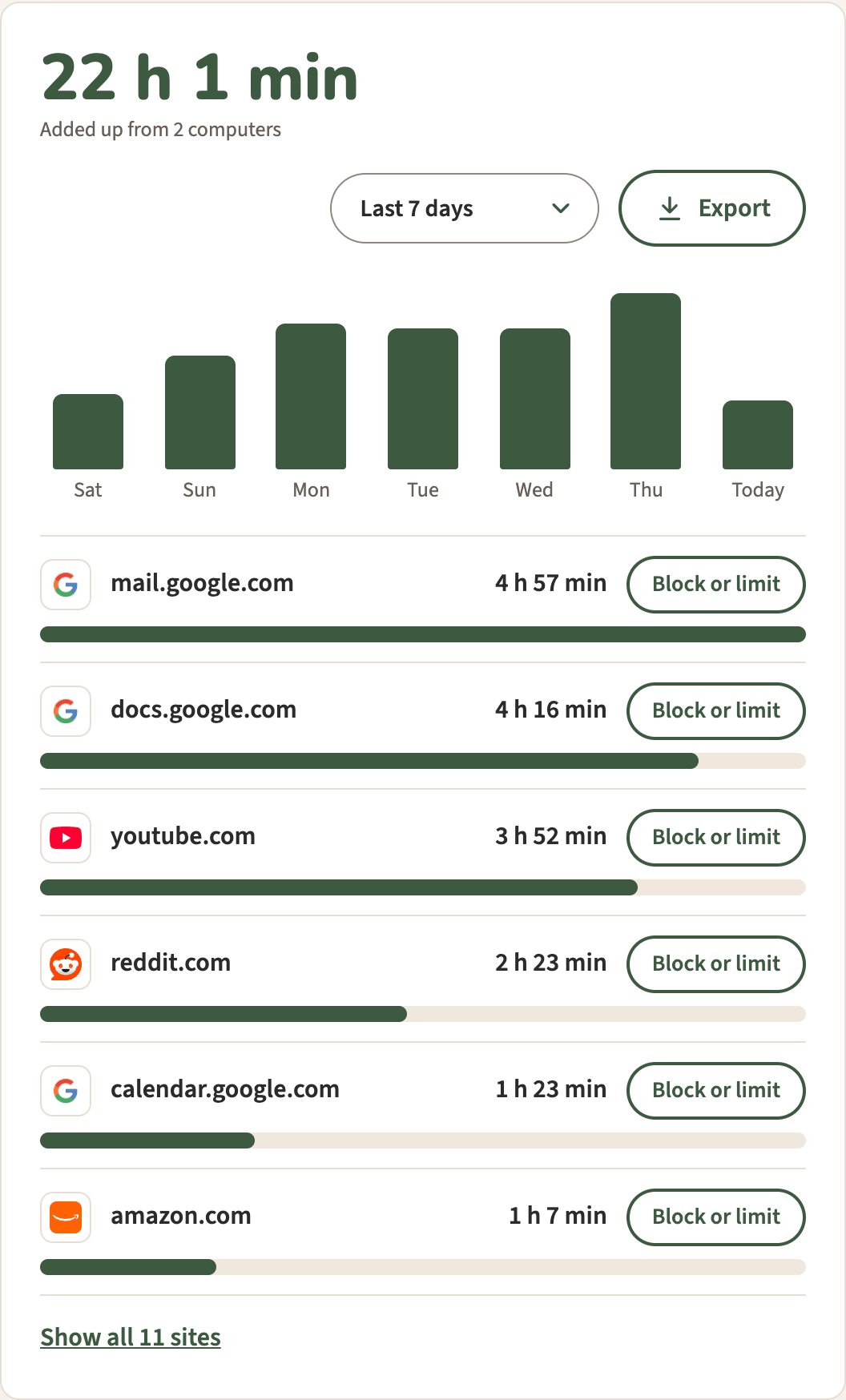
It’s free for 30 days, with no card. After that, without the plan, today, the last 7 days, your top sites and a basic Monday email stay free. The last 30 days, Export, Block or limit and the full email come with the plan, $3.33 a month, billed yearly at $40 (or $5 billed monthly). It doesn’t run in Firefox or Safari, or on phones.
What to check before you install a free tracker
- The permissions. Chrome shows what an extension can access before you add it. Our guide to the “read and change all your data” warning explains what one common warning allows.
- The privacy policy. Look for where your list of sites goes: kept on your computer, sent to the maker, or shared.
- The store’s data section. A Chrome Web Store listing says what data its developer declares the extension handles.
- When it was last updated. The listing shows the date.
Screen time, in Chrome and Edge
Pawsome Family’s Screen time counts the minutes each site is on your screen, with no timers to start. It comes with Milo, a golden retriever who walks along the bottom of your tabs and can be hidden. Here’s how it works.
Free for 30 days, with no card needed.