Toggl vs automatic time tracking: which suits you?
By Aditya Trivedi ·
Toggl Track is built around timers you start and stop for each task, project or client, which suits billing and team reports. Automatic time tracking counts for you, with nothing to press, which suits anyone who wants to see where the day went without remembering to log it. Toggl’s desktop app records some activity on its own, but you turn it into time entries by hand. Choose Toggl if you bill by the hour, and an automatic tracker if you want a plain count of your browser time.
We make Pawsome Family, a Chrome and Edge extension whose Screen time counts how long each website is on your screen, so we’re on one side of this. We haven’t tested Toggl Track. What we say about it comes from its own website, help pages and store listing, checked on November 13, 2026.
What Toggl Track is
Toggl Track is made by Toggl OÜ in Tallinn, Estonia. It offers “Manual & real-time timers, focus mode, and calendar integrations” on Windows, Mac, iPhone, iPad, Android and the web, with browser extensions for Chrome, Edge and Firefox.
- Free: “free forever”, with timers, focus mode, calendar integrations, tasks and personal reports. The pricing page describes it as “Free for a limited number of users”.
- Starter: $9 a user a month billed yearly, or $12 billed monthly. Adds team productivity and revenue reports.
- Premium: $16 a user a month billed yearly, or $24 billed monthly. Adds profitability and labor cost reports.
- Trial: 30 days on Starter and Premium.
The pricing page also lists exports to PDF, CSV and Excel, and scheduled report emails.
How the Chrome extension works
The extension “Puts a timer into any web tool”, with buttons inside more than 120 tools such as Trello, Asana, Jira and Notion. You start a timer, say what you’re working on, and stop it when you’re done. If a timer runs while you’re away, it can tell you and let you keep or discard that time.
Its Auto Tracker setting starts a timer on pages you choose, once you’ve spent a set number of seconds there, and stops it “when you close the tab or browser”. It doesn’t count every site on its own.
What the desktop app records
Toggl’s Windows and Mac app has an automatic part, called desktop activity tracking, Timeline or My Activity on different pages. While the app is open, it records “apps and websites used for over 10 seconds”. For Chrome, Toggl says “Only the site’s name is kept, never the full address, and incognito windows are skipped.”
To turn that activity into tracked time, you “copy activities as time entries and submit”. With syncing turned off, Toggl says the recorded activity never leaves your computer. An optional Auto mode sends it to Toggl’s AI service to draft your time logs.
What automatic time tracking means
An automatic tracker counts by itself. You add it once, and it notes which site is on your screen and for how long. There are no tasks to name and no timer to forget. The trade-off is that it knows the site, not the client or project the time was for. See how to track your time in Chrome automatically.
Side by side
| Toggl Track | Pawsome Family Screen time | |
|---|---|---|
| How it counts | Timers you start and stop | On its own, while a site is on screen |
| Every site in the browser | No; Auto Tracker times pages you choose | Yes, in Chrome and Edge |
| Projects and clients | Yes | No, sites only |
| Works on | Windows, Mac, phones, the web; Chrome, Edge and Firefox extensions | Chrome and Edge on computers |
| Teams | Yes, priced per user | No |
| Free | Free plan, “free forever” | 30 days; then today, the last 7 days and top sites |
| Cheapest paid | $9 a user a month, billed yearly ($108 a year) | $3.33 a month, billed yearly ($40 a year) |
| Blocking sites | Not mentioned on its pages | Block or limit, through our website blocker |
Prices and features checked on their own sites and store pages in November 2026.
When Toggl fits better
- You bill by the hour. Timers per client and project, with revenue reports on paid plans.
- Your work isn’t all in a browser. Toggl runs on computers and phones, and its desktop app sees other apps.
- You work in a team. Plans and reports are built around users.
- You use Firefox. Toggl’s extension works there, and ours doesn’t.
When automatic tracking fits better
- You forget to start timers. Nothing to press, so nothing is missed.
- You want the full picture. It counts the sites you wouldn’t think to log, too.
- You want a weekly look back. Screen time’s Monday email sums up the week before.
- You use two computers. Sign in on both and see one total.
You can also use both: Toggl’s timers for billing, and an automatic count to see where the rest of the day went. For freelancers, our post on tracking time per client without timers covers what an automatic tracker can and can’t split.
What Screen time counts
Screen time counts a site only while its tab is on your screen. It stops after 2 minutes without the mouse or keyboard, unless a video is playing in that tab, and private windows are never counted. A site is its address without “www.”, like youtube.com, and mail.google.com counts as its own site.
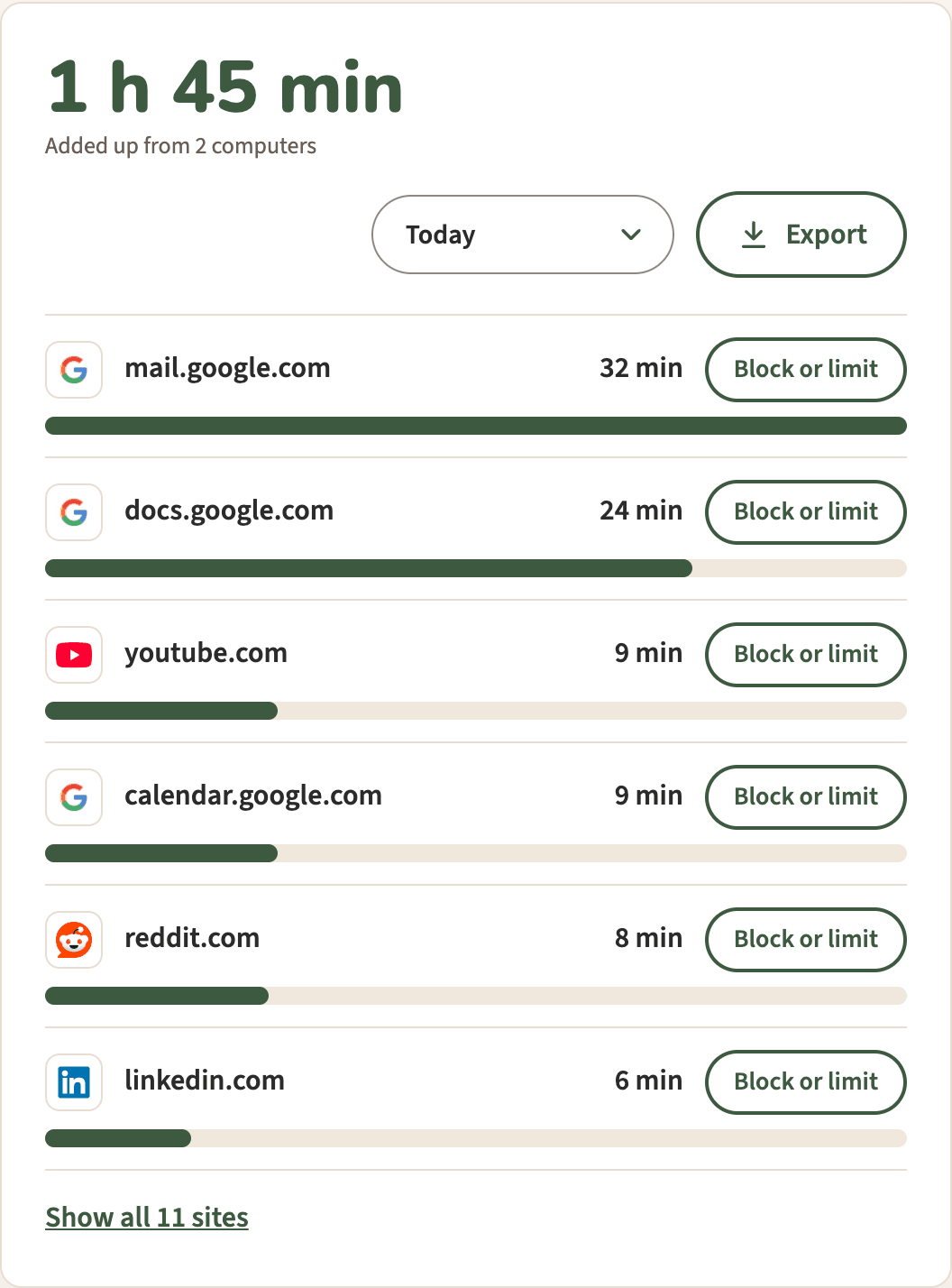
We keep each site’s name and its minutes for each day, never page addresses or titles. Export downloads a spreadsheet with the time on each site for each day. See how to export your browsing time to a spreadsheet.
Screen time, with no timers to start
Pawsome Family’s Screen time counts the minutes each site is on your screen in Chrome and Edge, adds up your computers, and sends a short summary every Monday. It comes with Milo, a golden retriever who walks along the bottom of your tabs and can be hidden. See how it works.
Free for 30 days, with no card needed.