RescueTime alternatives
By Aditya Trivedi ·

The best RescueTime alternative depends on which part of it you use. For projects and clients, Toggl Track and Clockify are timer apps with free plans. For a free count of time on each website, Webtime Tracker and Time Tracker - Web Habit Builder are Chrome extensions that keep everything on your computer. And if you only need your browser time, added up across computers with a summary every Monday, Pawsome Family’s Screen time does that in Chrome and Edge.
We make Pawsome Family, a Chrome and Edge extension whose Screen time counts how long each website is on your screen, so it’s one of the options here. We haven’t tested the others. What we say about each one comes from its own website, help pages or store listing, checked on November 13, 2026. Prices change, so check before you buy.
What RescueTime does today
RescueTime is an app that “runs in the background, automatically tracking time spent on apps and websites”. It counts the whole computer, not just the browser, and reads Chrome without an extension. Its own pages list:
- Computers: Windows 10 and 11, and macOS Big Sur or later. Linux and ChromeOS aren’t listed.
- Phones: iPhone with iOS 17 or later, and Android 8 or later.
- Two products: Focus covers tracking, goals, alerts, blocking and reports. Timesheets covers project, client and task time, billable hours and invoicing.
- A free plan: automatic tracking, reports, one goal, weekly summaries, and data from the past two weeks.
- Paid plans: Solo (Focus) is $9 a month, or $84 a year. Solo+ adds Timesheets for $15 a month, or $144 a year. Every paid plan has a 14-day free trial.
Its data goes to RescueTime’s servers every few minutes. It says, “We are not an ad supported company.”
Why people look for an alternative
- Linux or a Chromebook. RescueTime’s help pages list Windows and Mac computers only.
- More history for free. The free plan shows the past two weeks.
- What it sees. RescueTime “observes window titles and active applications, not keystrokes, not text, not website content”. Some people want a tracker that keeps less, or keeps everything on the computer.
The alternatives at a glance
| Tracker | How it counts | Works on | Price |
|---|---|---|---|
| Toggl Track | Timers; its desktop app also records apps and sites | Windows, Mac, phones, the web, Chrome, Edge, Firefox | Free plan; Starter $9 a user a month, billed yearly |
| Clockify | Timers; its desktop app has an auto tracker | Windows, Mac, Linux, phones, any browser | Free plan; Basic $3.99 a seat a month, billed yearly |
| Webtime Tracker | On its own, per site | Chrome | Free, no ads |
| Time Tracker - Web Habit Builder | On its own, per site | Chrome, Edge, Firefox | Free |
| Pawsome Family Screen time | On its own, per site | Chrome and Edge on computers | Free for 30 days, then $3.33 a month, billed yearly |
Prices and features checked on their own sites and store pages in November 2026.
Timer apps, for projects and clients
Toggl Track
Mainly start and stop timers for work, projects and clients. Its browser extension “Puts a timer into any web tool”, like Trello, Asana or Notion. The Windows and Mac desktop app also records “apps and websites used for over 10 seconds” on a timeline, and you copy what you want into time entries yourself. The Free plan is “free forever”. Starter is $9 a user a month billed yearly, or $12 billed monthly, with a 30-day trial. More in Toggl vs automatic time tracking.
Clockify
A timer and timesheet app made by CAKE.com. The free plan covers up to 5 users, with reports over 1 month and PDF export. Its Windows, Mac and Linux apps include an auto tracker that records apps and sites, but those records “aren’t automatically added to your timesheet”. Basic is $3.99 a seat a month billed yearly, or $4.99 billed monthly. Prices vary by region, and tax is extra. More in Clockify vs automatic time tracking.
Free extensions that count each site
Webtime Tracker
A Chrome extension, made by one developer, that counts time on each website on its own, with charts and CSV export. It’s “Completely free and with no ads”, and its privacy policy says “All data are stored offline in your browser.” There’s no account, so each browser keeps its own numbers. Its Chrome listing was last updated on March 31, 2025. See Webtime Tracker alternatives.
Time Tracker - Web Habit Builder
Free and open source, for Chrome, Edge and Firefox. It “automatically logs screen time” by site, and says “100% of your history stays on your machine”, with no account required. It also has a website blocker with time limits, export to CSV or JSON, and optional sync through a storage service you choose.
A browser tracker that adds up your computers
Pawsome Family Screen time
Screen time is part of the Pawsome Family extension for Chrome and Edge. It counts a site only while its tab is on your screen, and stops after 2 minutes without the mouse or keyboard, unless a video is playing in that tab. Private windows are never counted. Sign in on two computers and the page shows one total.
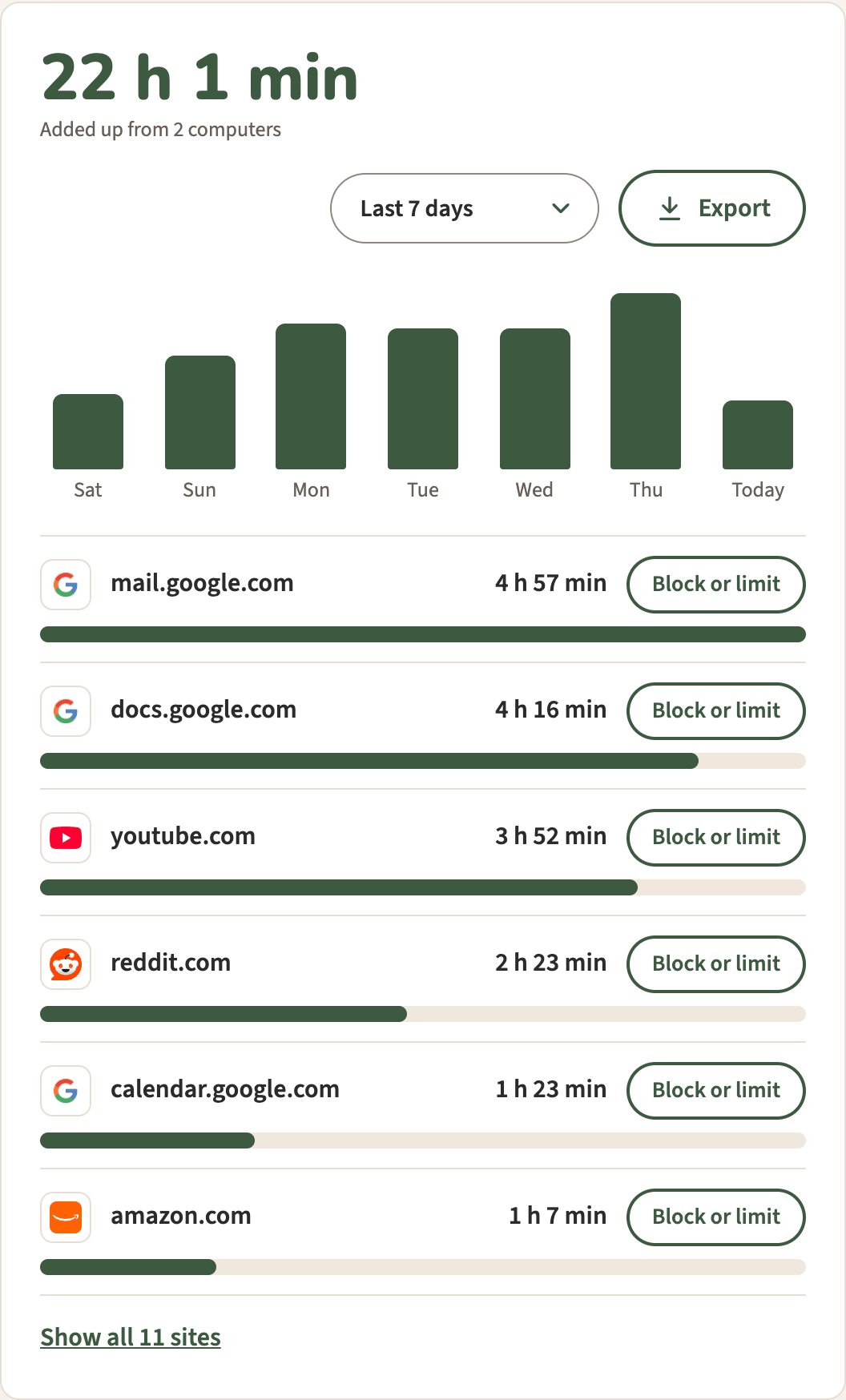
The page shows Today, Last 7 days or Last 30 days, with Export to a spreadsheet and Block or limit next to each site, which adds it to our website blocker. A Monday email sums up the week before. We keep only each site’s name, like youtube.com, and its minutes for each day. Never page addresses, titles or anything on the page.
What it doesn’t do: count other apps, phones, Firefox or Safari, or run timers. It counts by site, not by project or client, and has no invoices or team plans.
How to choose
- Your whole computer and your phone, with goals and blocking: RescueTime itself.
- Timers for projects and clients: Toggl Track or Clockify.
- Free, with nothing leaving your computer: Webtime Tracker or Time Tracker - Web Habit Builder.
- Browser time across two computers, with a Monday summary and a blocker built in: Pawsome Family.
For RescueTime and a browser tracker side by side, see RescueTime vs a browser time tracker.
Screen time, in Chrome and Edge
Pawsome Family’s Screen time counts the minutes each site is on your screen, with no timers to start. It comes with Milo, a golden retriever who walks along the bottom of your tabs and can be hidden. After the trial, today, the last 7 days and your top sites stay free. Here’s how it works.
Free for 30 days, with no card needed.