How to set a daily time limit for a website
By Aditya Trivedi · Updated

To give yourself a set amount of time on a website each day, use a website blocker with a daily limit. You pick the minutes, it counts the time you spend on the site, and it blocks the site once they’re used, until the next day. In Pawsome Family, choose Daily limit next to the site and pick 15 min, 30 min, 1 hour or your own number. Chrome and Edge can’t do this on their own.
We make Pawsome Family, a Chrome and Edge extension with a website blocker, so the steps below use it. Checked on November 11, 2026.
Step by step
- Open Website blocker in the Pawsome Family app, under Pawsome tools. New to it? Start at pawsome.family/website-blocker.
- Add the site, like reddit.com, and select Add.
- Select Daily limit next to it.
- Choose the time: 15 min, 30 min, 1 hour, or type a number of minutes.
- Save. The line under the site shows your limit and how much you’ve used today.
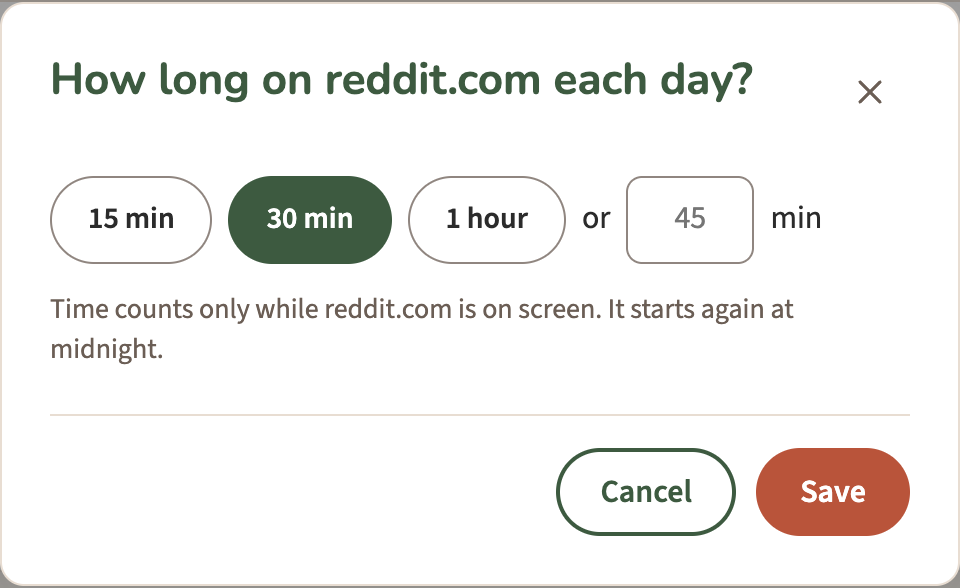
To change the minutes, select Edit under the site.
How the time is counted
- Only while the site is on screen. A tab left open in the background doesn’t use up your minutes.
- It starts again at midnight. Each day you get the full amount back.
- Your pet warns you. When 5 minutes are left, your pet says so in a speech bubble.
- When the time’s up, the site shows the blocked page for the rest of the day, with a small dog walking along the bottom.
How much time to allow
There’s no right number, but a few ways to choose:
- Start from what you use now. If you spend about an hour a day on a site, a 30-minute limit is a real change you can keep.
- Use a limit for sites you need, and a block for those you don’t. A daily limit suits a news site or YouTube for work. A site you only ever regret is better set to Always.
- Give each site its own limit. Each one counts separately.
- Adjust after a week. If you hit the limit by 10 am every day, it’s either too low or the site needs a schedule instead.
Pick the limit from your real numbers
Instead of guessing how long you spend on a site, measure it first. Pawsome Family’s Screen time counts the minutes each site is on your screen. Open it in the app, choose Last 7 days, and divide a site’s time by 7 for a rough daily average. A limit of about half that is a good start. Select Block or limit next to the site, choose Daily limit and 15 min, 30 min or 1 hour, then Add to Website blocker. For a full plan, see how to cut your social media time in half.
Limit, schedule or block?
| Choose | When |
|---|---|
| Daily limit | You want some time on the site, just less of it |
| Days and times | The site is fine, just not during work or study hours. See blocking a site during work hours |
| Always | You don’t want the site at all |
Built-in options, and where they stop
- Chrome and Edge have no daily limit setting.
- On a Mac, Screen Time’s App Limits can limit a website: add a limit, choose a site under Websites, set the time and tick Block at end of limit. Apple lists this under Safari and doesn’t say whether it works in Chrome, so test it in the browser you use.
- Instagram’s daily limit is in the phone app only, and for adults it’s a reminder, not a block. See blocking social media for a set time.
After the free trial
Daily limits come with the plan. If the trial ends without one, your limits are kept but paused, and sites set to Always stay blocked for free. Get the plan, and they come back as they were.
A website blocker with a dog in it
Pawsome Family’s website blocker blocks the sites you choose in Chrome and Edge: always, on the days and times you pick, or after a daily limit. Here’s every setting.
Free for 30 days, with no card needed.